Empty miles aren’t just inefficient, they’re a direct line item against your margin. Every gallon burned while empty is a gallon you paid for with no return. On a week where you’re running tight lanes or thin rates, deadhead can turn a profitable trip into a wash, or worse, a loss.
The problem isn’t that carriers don’t know this. They do. The problem is that until recently, you couldn’t see reload availability until after you’d already committed to a load. That meant you were pricing only the first leg. And after you dropped, you were starting the search for your next load from scratch, burning time between runs that could have been spent moving freight.
If you’d known what was waiting at the delivery stop before you booked, you might have bid differently, or lined up your next load before you even arrived. That’s what this update makes possible.
Reloads are now on the load details screen, before you book
Reloads have existed on the Convoy app, but until now, they only appeared after you’d booked. Carriers told us that wasn’t good enough. We listened.
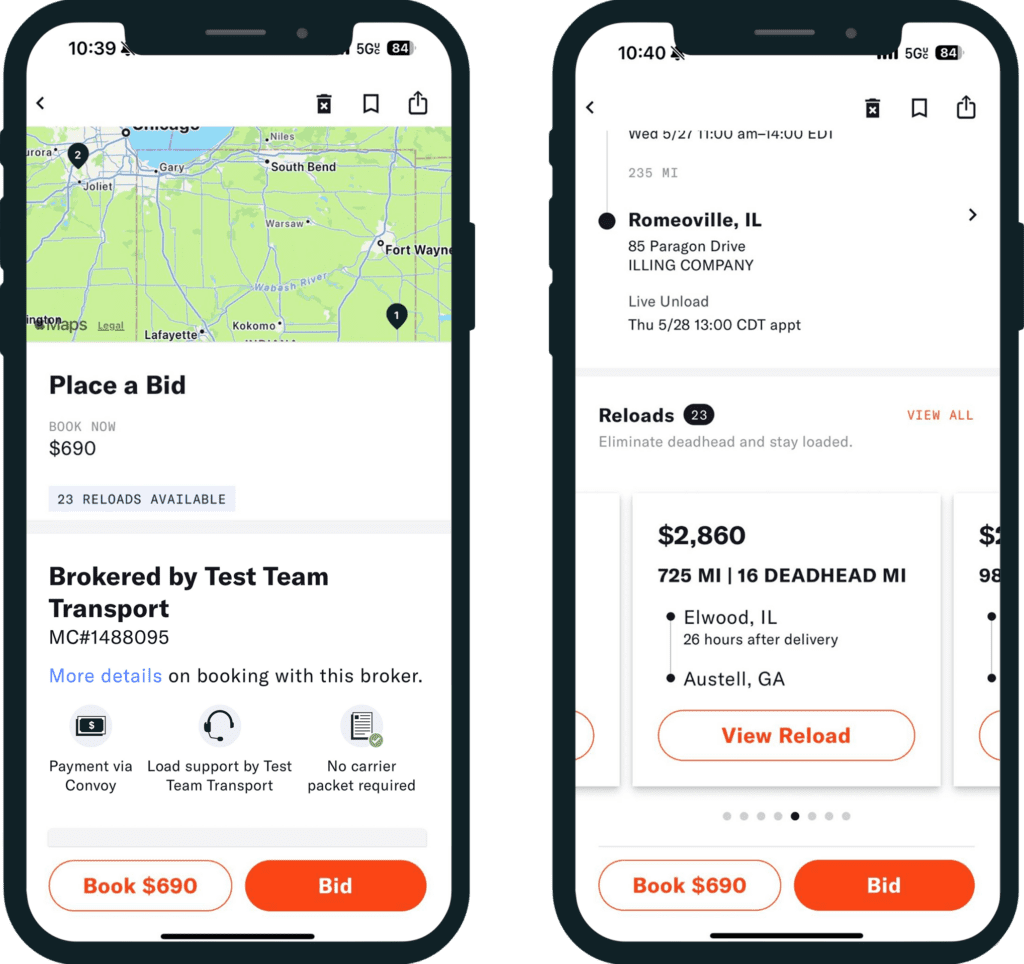
Now when you open a load in the Convoy app, you’ll see a reloads badge near the top of the load details screen. It shows how many reloads are available from that delivery stop. Scroll past the stop details and you’ll find a carousel of reload options, each showing payout, total miles, deadhead miles to the reload pickup, and how soon after delivery the pickup window opens.
You can browse the carousel without leaving the screen, tap into any load for full details, or open the full list and sort by payout, pickup time, or destination. A max deadhead filter lets you set how far you’re willing to run empty before the next pickup.
“Seeing potential reloads before booking is making a noticeable difference. It gives us the ability to plan the next move before committing the truck.” — Amber, Expedice Logistics
Reloads give you the complete picture of a trip before you commit, and it cuts the time you spend searching for your next load after you drop. Less guessing on the front end, less dead time on the back end, and more miles with freight in the trailer.
How to get started
Make sure you’re on the latest version of the Convoy app. Open any load and look for the reloads badge at the top of the load details screen. If reloads are available, you’ll see the count and can scroll down to browse.
New to the Convoy Platform? Sign up here.